

VIDEO: Run Anywhere. Automate Everything. k0rdent in 30 seconds.

Nebul: Delivering Sovereign AI Clouds for European Enterprises
Discover how a neocloud uses Mirantis k0rdent AI to achieve "shared nothing" security without the pain of Kubernetes sprawl.
VIDEO: Run Anywhere. Automate Everything. k0rdent in 30 seconds.
Nebul: Delivering Sovereign AI Clouds for European Enterprises
Discover how a neocloud uses Mirantis k0rdent AI to achieve "shared nothing" security without the pain of Kubernetes sprawl.
MIRANTIS SECURE REGISTRY
Your private, cloud native hub for container images.
Software supply chain attacks paralyze businesses — often introducing malicious container images early in the development pipeline. Public container registries are rife with corrupted images. As organizations scale their use of containers across multiple teams, clusters, and clouds, how can they keep development moving forward swiftly and securely?
Mirantis Secure Registry (MSR) provides an enterprise-grade, policy-driven, private container registry solution that can be easily integrated to provide image storage and control and a critical system of record for secure software supply chains. MSR is built on Harbor, the CNCF-graduated, open-source registry trusted by enterprises worldwide. Harbor combines a rich feature set, including RBAC, image signing, CVE scanning, and OCI artifact support, with proven scalability and extensibility. With MSR, we’ve taken Harbor upstream and added rigorous testing and validation, 24x7 enterprise support, and long-term maintenance, making it a safe and strategic choice for organizations seeking to secure and operationalize their container workflows. MSR is the number one CNCF Registry for Kubernetes, and Docker and Podman compatible.

MSR features OCI-compatible mirroring to any public or private cloud registry.

Why enterprises prefer Mirantis for Harbor
When you choose Mirantis Secure Registry, you’re not just adopting Harbor; you’re gaining a production-hardened, fully supported container registry platform, maintained by professionals who live and breathe Harbor every day.
Each release of MSR is tested and validated across a comprehensive matrix of infrastructure configurations, operating systems, and Kubernetes distributions. Mirantis ensures that your registry performs consistently by supporting core Harbor services and key middleware components.
Additionally, Mirantis provides:
Extensive Testing and validation: Release offerings have been thoroughly tested and documented to prevent issues in middleware and operating system components beyond Harbor
Support & Professional Services: 8x5 or 24x7 support for Harbor, plus turnkey professional services to help organizations attain the highest level of service for their environment
Dedicated Harbor development team: Experts focused on delivering bug fixes, CVE security updates, middleware updates, and more
Extensive documentation: In-depth guidance that covers nearly every scenario for deploying and managing MSR, with deep dives into complex topics such as HA installs with Helm
CNCF Harbor community participation: Contributions to influence and align with industry standards, participation in maintainer calls, along with sponsorship of CNCF events related to Harbor
Prescriptive migration support: Clear paths from legacy registries, including earlier MSR versions, to simplify transitions
How it works
Public container registries are hosted out in the open, while many private registries operate from providers’ clouds. Mirantis Secure Registry works where you need it, including on your clusters themselves, putting you back in control. Whether deployed on-prem, in public cloud, or across hybrid environments, MSR is engineered for resiliency and operational continuity, with built-in support for high availability, mirroring, and backups.
Mirantis Secure Registry is an enterprise-grade container registry that can be easily integrated with standard Kubernetes distributions and enables modern DevSecOps practices with built-in tools to secure and verify the integrity of your container workloads.
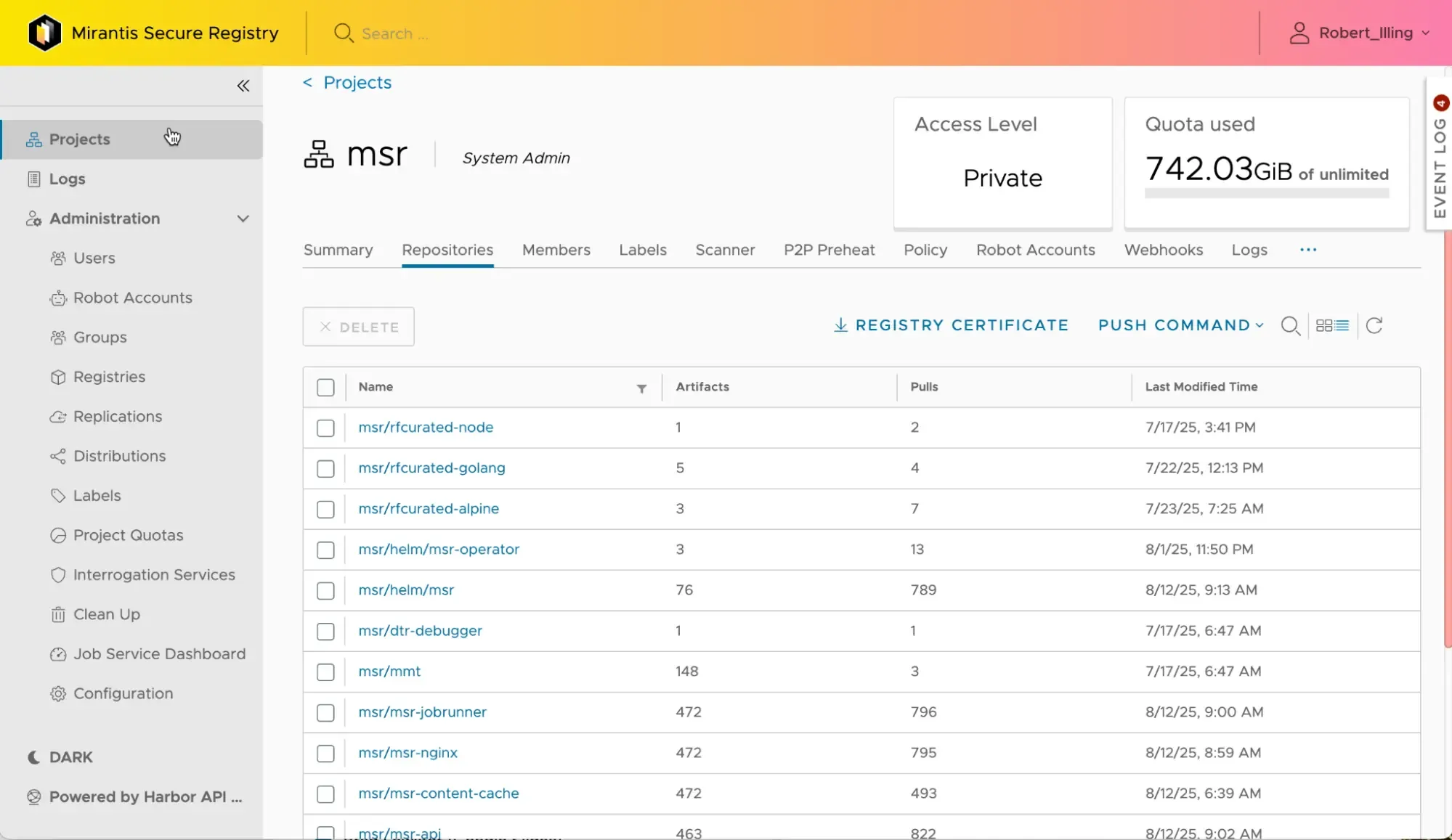
Projects page lists repositories and reports usage trends, storage consumption, and repository activity.
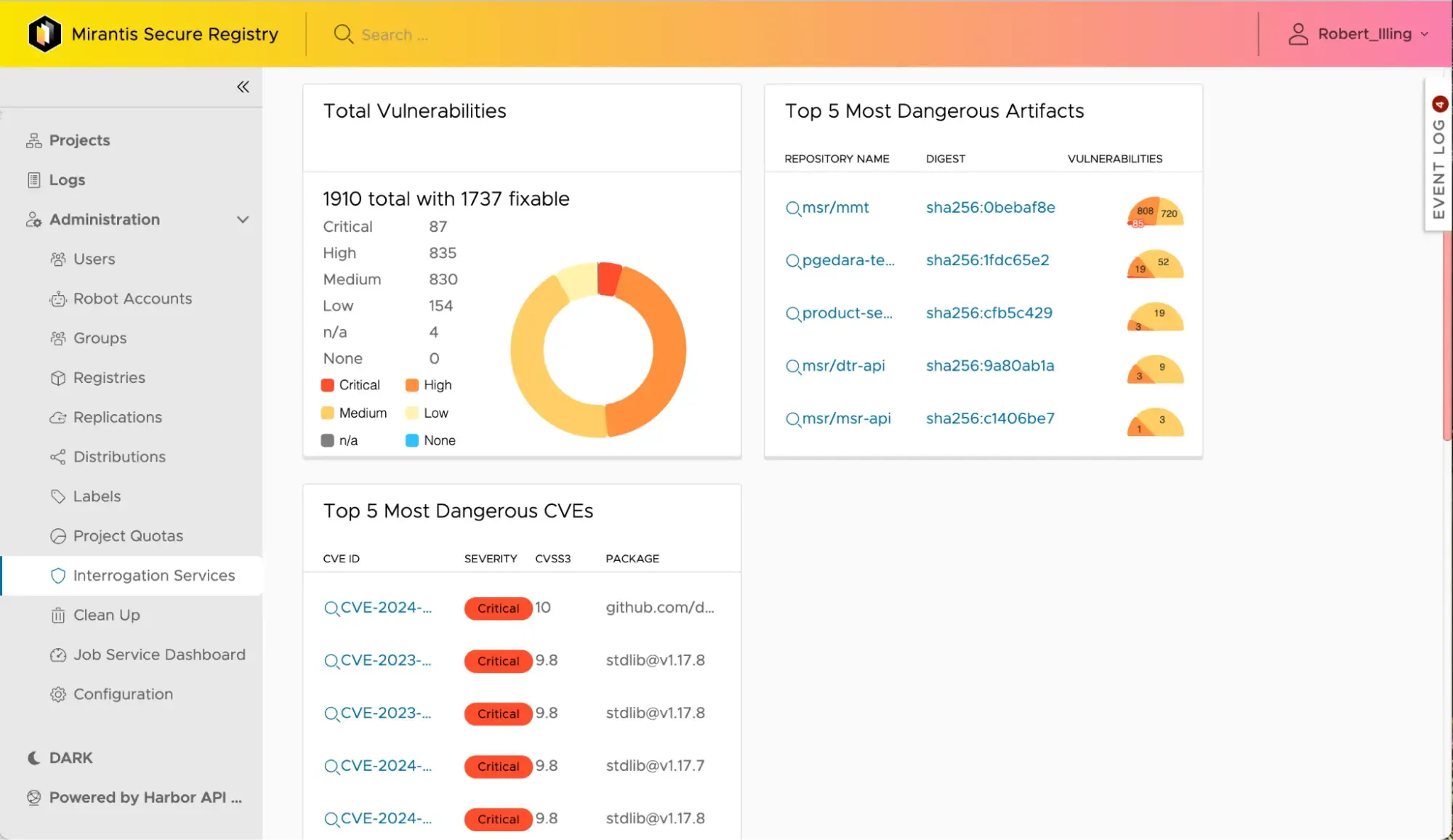
Interrogation Services dashboard highlights most dangerous vulnerabilities and artifacts, helping teams prioritize security fixes.

Role-based access control (RBAC)
Integrate with internal user directories to implement fine-grained access policies. Synchronize multiple repositories for separation of concerns from development through production.

Image vulnerability scanning
Continuously scan images at the binary level using Trivy, with support for CVE policies and automatic blocking for non-compliant images.

SBOM generation and management
Automatically or manually generate Software Bill of Materials for your images. View, download, and replicate SBOMs across multiple MSR instances to increase transparency and compliance.

Image signing
Developers and CI tools can digitally sign contents and publishers of images, so downstream users and automation tools can verify image authenticity before running.

Caching and mirroring
Mirror and cache container image repositories to avoid network bottlenecks and make images available across multiple sites. MSR features OCI-compatible mirroring to any public or private registry.

CloudNativeAI integration
Integrate with CloudNativeAI (CNAI) for seamless management, versioning, and retrieval of AI models in order to improve consistency, traceability, and automation throughout the ML lifecycle.

Image lifecycle
Control costs by automatically cleaning up images based on policy controls such as the date of the last update or the number of recent images you want to keep, along with immutable tags, quotas, and retention policies.

OpsCare:
24/7 Enterprise Support

24x7x365 Always On Support

30 min initial response time for Severity 1 incidents

ISO 27001, ISO 9001, ISO 14001 certified
)
)

DATASHEET:
Mirantis Secure Registry Datasheet
Check out Mirantis Container Runtime on Linux or Windows.

CHECKLIST:
Kubernetes Enterprise Security Checklist
Kubernetes and cloud applications let complex systems run reliably in unreliable environments.

DOCUMENTATION:
Mirantis Secure Registry Docs
Explore the Mirantis Secure Registry Reference Architecture, Installation Guide, Operations Guide, API Reference, and other docs to get all the technical details.
Your private container registry, solved
Mirantis Secure Registry drives software supply chain security across our cloud native stack. It integrates closely with Mirantis Container Runtime, which is FIPS-140-2 conformant and uses a cryptographic module validated by the National Institute of Science and Technology (NIST).
Mirantis Secure Registry can be one component of a transformative ZeroOps strategy, enabling you to reduce costs and accelerate development. Explore how you can build on your runtime to create a complete ZeroOps stack:

Mirantis Container Runtime
Secure, industry-standard container runtime—Docker interface included. The keystone of a secure software supply chain, integrating tightly with Mirantis Secure Registry.

DevOps-as-a-Service
Accelerate development with cloud native DevOps-as-a-service—bringing automation and cloud native expertise together to deliver guaranteed outcomes.
LET’S TALK
Contact us to learn how Mirantis can accelerate your cloud initiatives.
We see Mirantis as a strategic partner who can help us provide higher performance and greater success as we expand our cloud computing services internationally.
We see Mirantis as a strategic partner who can help us provide higher performance and greater success as we expand our cloud computing services internationally.
Frequently Asked Questions About Container Registries



900 E Hamilton Avenue
Suite 650
Campbell, CA 95008
+1-650-963-9828